I have an application with deeply nested models. I want to select several specific fields from a multi-layered “slice” of the data. And since we’re using CakePHP, I want to use Cake’s methods rather than writing my own custom query. How do I do this?
Let’s get specific with a look at the nested data. I need data from three models: PayStub, Employee, and Employer. The relationship goes like this:
So why is that so difficult? Let’s back up and look at the joined (but not chained) query to see where my expectations about Cake’s behavior came from. Here’s a query that only joins 2 models — PayStub and Employee. This query works just fine and returns joined data as expected.
Clearly that didn’t work, and I suspected that I would need to explicitly use Cake’s containable behavior. But it took me several tries before I found the right syntax for chaining containables. Here are my early attempts, in the absence of a specific, simple example on the CakePHP documentation site.
I dislike this because to restrict the fields, I need to do it two different places. So I thought I’d combine them and make the whole query consistent. Spoiler alert: this does not work:
It turns out the first join, Employee, really can define its fields in two places: either in the contain array, or in the fields array using dot notation. In other words, these are equivalent:
I’ve been looking for a new git GUI client in 2019
Why not just learn the command line, asks the smart guy in the room? Well, I have learned the command line, and I’ve even created some of my favorite shortcuts stolen from my last job such as git new <branchname> (which creates a new branch from origin/master and checks it out), git freshen (which merges origin/master into the current branch, useful for integrating the released work of other developers), and git release which merges the current branch into master.
But I really don’t like the command line for committing changes. A git GUI will show me, at a glance, every file that has changed and what the actual changes are. It lets me enter text for a commit message without dipping into VIM. And it gives me a far better view of the graph of all commits than the command line. So I use both.
Away from SourceTree, and not Tower
I’ve been using SourceTree for Windows. It is good enough and it meets my relatively simple needs. But when I’m having a bad computer day — when I have too many programs and processes open and things are running “slower than Bela Tarr’s molasses in February,” SourceTree is usually one of the bigger CPU and memory hogs.
I have actually paid for Git Tower. I started using it on my Mac years ago. When they released a Windows version I was excited to be a beta tester. But since then they have moved from a one-time fee to a $70 per year license fee. I will not use them any more.
GitKraken turns up on many of my searches as a very good alternative. I even downloaded it once, only to find that it wouldn’t work on my office computer because you have to be logged in to their server in order to use the software (or hack a workaround). This request feels extra creepy to me, and the relative contempt shown by the founder make me just plain not want to get involved.
Two new favorites: Fork and SmartGit
I have gotten to this point in the past and given up hope.
But it’s late 2019 and I thought I’d try another search.
I have found two new favorites, and they both “feel” much faster than SourceTree: SmartGit and Fork. Both of them are cross-platform: I can use them on both Mac and Windows.
This is not a review; just a place for me to gripe about how hard it was to find a GUI that I liked. Suffice it to say that both SmartGit and Fork have all the visual assists that I was looking for — good graphs, easy commits, and not too “heavy.”
Are they free?
I have gotten past the point where every program I install has to be free. In fact, I would rather pay for a license than be subject to ads, or to worry about how my data is being used. So if you’re looking for free, don’t ask me for a recommendation.
But yes, for now, it appears that Fork can be used for free. I have downloaded and installed it. They did not ask for money. There is a “license” page on their web site that does not mention money. However, within the application there is an “activate Fork” menu item:
When I click “Buy Now” I am directed to a Buy page where they ask for $49, as a one-time fee. If I decide to use Fork over SmartGit, I will gladly pay fifty bucks, one time, for some good software that I use every day.
SmartGit has a 30-day free trial. After that there are many purchase options. The cheapest I can find is $81, for a one-year license with 90 days of support. Now, after the year is up, you can still use SmartGit. You just can’t get free updates.
Since Fork is cheaper, but especially because for now it “feels” faster, I will probably end up paying for Fork. (Also, I noticed that I made a mistake in one of my repositories when I was using SmartGit — I accidentally committed a file that I didn’t mean to commit. I was confused about what was in my git index and what was simply a changed file. I haven’t studied the interface to see exactly how I made that mistake, but it feels like one more reason to go with Fork.
I ordered two of these things. While assembling the first one, I managed to break a little piece of metal. In the picture below, notice the missing metal “tooth” from the cover on the right. That’s what I broke off.
So why did I go and break the tooth off? Because of a manufacturing defect, that’s why.
That metal tooth slides left and compresses a spring. While the tooth is left and the spring is compressed, you can slide the cover over the rest of the fob. When the spring is released, the tooth slides back to the right, where it grabs a plastic nub on the other part of the fob, holding it closed.
But the tooth and the plastic nub cannot work together as shipped. The plastic nub is too wide and the tooth can not slide far enough to get around it. If you force it, you will break off the tooth.
In this picture, with the two parts of the shell lined up and with the tooth pushed as far left as it will go, you can see that the tooth and the nub overlap by a little bit. (The nub is the small rectangle of plastic whose left edge is where the red arrow points down. The right edge of the tooth is where the green arrow points up.) The shell cannot be closed all the way.
On the second shell I ordered, I manually cut part of the plastic nub with a sharp utility knife. Eventually I was able to make the parts fit together.
Why post here and not on Amazon?
Because Amazon won’t let me post a review. I guess I haven’t spent enough money on their web site this year to be allowed to post a review:
So up yours, Amazon. And you are welcome for the feedback, Hello Auto.
Boulder Community Health (BCH) recently implemented a new Electronic Health Record (EHR) software system. The system is provided by Epic Systems.
I have decided to opt out of as much information sharing as I possibly can. In part, this is my own innate sense that privacy violations are creepy. In part, this is the software engineer in me being suspicious of large-scale software privileged with tons of private data. And in part this is sheer orneriness triggered by the David-versus-Goliath sense that someone like Epic Systems has more control over my data than I myself do. (More on Epic’s moral trustworthiness later.)
I’ll acknowledge, before I start, that you might not feel the same level of creepiness that I do when it comes to companies having your private data. And you might also have very good reasons for wanting your medical information shared as widely as possible. For example, maybe you travel often and want to be sure your medical record is widely available wherever you go. If that’s you, then go read something else.
Paper trail to digital portal
At an office visit, I got hold of a five-page handout called “Your Information. Your Rights. Our Responsibilities.” On pages 2 and 3 is a list of things I can opt out of, including “EPIC Care Everywhere, and something called CORHIO.
But let’s start by seeing if we can actually opt out of the EHR portal altogether.
They say you can’t lock the portal
BCH’s new customer-facing portal is branded “MyBCH.” I want to know if there is a way to disconnect my data from the portal entirely.
I naively asked someone behind a desk a question along these lines: “I don’t want there to be a portal account with my information.” I was reassured that by not opting in, my account would not be available to anyone.
But I realized that I didn’t ask the question the right way. What I want to know is whether I can make it so that even I cannot create a user account. I want my account completely locked. After all, someone who steals or buys my Social Security Number is not going to simply opt out on my behalf.
I found out that this is not possible. After reaching the Privacy Officer, she told me that you can’t request a lock on your account. The best I could hope for is to be “banned” from the system. I would have been willing to get myself banned, just to see how it worked…
… If only that were possible. Unfortunately, the Privacy Officer told me that they had not yet been trained on how to ban someone. So my best hope is to “plant a flag.” That is, sign up for an account before someone else does it in my name.
So I created an account.
MyBCH Security Is Hobbled
The first problem I encountered on the MyBCH portal was that my selected password (only 32 characters long) was not allowed because it was too good.
This is why I say “hobbled.” Why restrict me to a 20-character password if I am willing and interested in using something longer? What’s the point of implementing a maximum length restriction? According to a popular question on Stack Exchange, the most likely (and very sarcastic) answer has to do with monkeys, bananas, and stepladders.
The next problem that I encountered on the MyBCH portal was that my shortened password (now 19 characters long) was not allowed because it was … too long?!?
The following 19-character password, generated by a good password manager, fails with the explanation that the length must be between 8 and 20 characters.
¦à']í1¼UÁ¡½Z#µ2ø7¶/
Hmm. Do you suppose they have some other rules about password complexity that they are not telling their customers about?
After I shortened my password, then dumbed it down, I was finally allowed to create an account.
My next goal was to secure my medical records the same way I secure my banking and shopping accounts — with 2-factor authorization.
There Is no 2-Factor Authorization
There is no 2-Factor Authorization. After all, it’s only your medical records. It’s not like it’s your Amazon account or anything, you know, important.
I am guessing the lack of 2-factor authorization is a configuration choice made by BCH because I can find Epic Authenticatorapps on the internet. If that’s true, then this is a big security disappointment. There may be flaws with a given 2FA systems, but security researchers will say it’s better than not having one.
Opting out: the portal won’t do it for you
Now that I had a portal account, I hoped I could use it to opt out of my information being shared.
I was out of luck. To opt out, I am told, I must use email:
I sent an e-mail address to the correct address. I got a reply after about 2 days saying that I had been opted out of Care Everywhere.
The problem with using email to opt out, instead of the portal, is that I don’t know whether they actually did it. I don’t know that they found my record and not someone else’s. Nevertheless, I feel reassured that I am probably opted out — at least from Care Everywhere.
You can’t opt out of CORHIO without a Notary Public (unless you are at a doctor’s visit, apparently). So I’ll be skipping this step for now.
Hopefully next time I have an appointment with a medical professional, I will remember to not only ask about my health, but to also ask her to do the important job of clicking some box on a form somewhere so that I can opt out of data sharing.
Did BCH agree to any “Gag Clauses” with Epic?
You might remember I said I had an innate mistrust of Goliath-sized data aggregators. In researching Epic System’s track record, I found that several doctors have raised concerns that EPIC forces gag clauses on providers who use their portal.
The idea that you sign away your first amendment rights for the privilege of doing business with someone sounds pretty un-American to me. This is another one of those issues that raises my hackles. It gives me an immediate dislike for Epic Systems, and really makes me question their moral trustworthiness. (In fairness, some articles quote an Epic spokesperson saying they don’t have “clauses that prohibit criticism.” On the other hand, other articles say that research has documented gag clauses in Epic contracts. My instinct is to believe public-interest researchers over corporate Goliaths, but there doesn’t seem to be a definitive answer out there.)
For the sake of my patriotism and my health, I am hoping that BCH did not go there, and that Epic Systems didn’t ask them to. But that’s just hope, for now.
In the meantime, I have asked BCH (via the portal), whether they have signed any gag clauses with Epic Systems.
I am hoping they will give me an honest answer. If such a thing is even allowed.
Partial accidental success: lock your account
As I tried to log back into my portal to see if anyone had answered my questions about 2-factor authorization and whether BCH agreed to a gag clause, I had an unexpected, ironic bit of “success,” if that’s what you can call it.
While trying to log in, and because of some apparently bad software, I managed to lock myself out.
I didn’t actually intend to, but after logging in with my name and password I was directed to a screen supposedly showing me an additional security check. Probably this was intended to show me a CAPTCHA screen. However, for whatever reason, no CAPTCHA appeared. I am guessing this is because the CAPTCHA would have been served by a third-party web site or required third-party cookies, which my browser refuses.
(I should rant here about software testing that ignores people using privacy browsers or who disable third-party cookies, but since I wasn’t watching network traffic when MyBCH failed to serve the additional security check, I can’t swear that this was the problem.)
In any case, after clicking “next” a couple of times without solving whatever additional security was supposed to be solved, my account was disabled.
The portal tells me that I need to contact BCH directly. Which is exactly what I wanted in the first place!
The only down side is that I’ll never know whether BCH answered my questions about 2-factor authorization and the gag clause.
Add those to the list of questions to ask my doctor next time. I hope we have time to get to the state of my health.
CakePHP has infrastructure to remove tables created in the test database as fixtures. The documentation implies that these tables will be removed as part of the test cleanup. But it is not happening. Here is where it fails. This class is CakeTestRunner
The fixture manager would remove the tables at $fixture->shutdown(); but it’s not happening because the line above calls doRun without passing false as the third parameter. Therefore, doRun exits and the fixtures are never removed. And because the third parameter is missing — that is, because it is is not surfaced to my own code — it cannot be overridden.
You have to “reissue” the certificate. First step is to create a new Certificate Signing Request (CSR) on the host. CPanel allows you to put multiple domains on the CSR, and that’s how you add a new domain to an existing certificate.
Next step is to “reissue” the certificate. I used Namecheap, and the instructions for getting to “reissue” are here: https://www.namecheap.com/support/knowledgebase/article.aspx/811/70/how-do-i-reissue-my-ssl-certificate their screen shots are out of date. The “Domain list” page is here: https://ap.www.namecheap.com/Domains/DomainList
Then I verify my identity with Namecheap. There are different methods — email, HTTP, and DNS.
Eventually they issue a new certificate. I save the .zip file to my computer so that I can upload it to my host. CPanel has a section for SSL/TLS where I can upload new certificates, which I do.
CPanel wants a .crt file. It accepted the .zip I got from Namecheap, but it didn’t actually stick. so either upload the .crt or paste the text of the certificate instead.
Wow, it sure took me a long time to find an example of how to write a unit test for my CakePHP console (shell) commands. There’s no how-to in the CakePHP documentation, and the only blog post I could find was this thing from 2009 and a correspondingly outdated version of the software.
I eventually found some code on github that Mark Story himself had written for a side project, and using that I was able to put together a bare-bones example of how to write a unit test for a CakePHP console (shell) command.
I deliberately wrote a really dumb shell to test because I just wanted to see that a test could be written. I figured, once I had the pattern I could write more sophisticated tests.
Anyway, if you’re stuck like I was, please follow along.
Step 1: create a really dumb console
Create a file called ThingyShell.php in this folder of your CakePHP application: /app/Console/Command/
These are the contents. (Later, we’ll test the method called getFour().):
<?php
class ThingyShell extends Shell {
    public function main()
    {
        $four = $this->getFour();
        $this->out($four);
    }

    public function getFour()
    {
        return "4";
    }
}
Step 2: make sure your console runs
I wanted to make sure I didn’t include any dumb errors in my dumb shell, so I ran the console locally to ensure it works:
Essentially, the ThingyShell getMock is saying: replace the methods called ‘in’, ‘err’, ‘createFile’, ‘_stop’, and ‘clear’ with the variables offered on the next line. And those variables are empty mocks of ConsoleOutput and ConsoleInput.
Any methods not replaced will run on your real ThingyShell object.
Once you’ve got this proof of concept working, you should be able to expand on it to write real unit tests on your real console shells.
I found myself asking (again) why XDebug wasn’t working, after installing a new IDE. I’d set a breakpoint, debug the page, but never see the code stop.
I had trouble getting it to run the last time I tried a new IDE, but I didn’t remember exactly what the problem was. This blog post is to remind me how to quickly get XDebug up and running correctly in a new IDE.
Short answer this time: XDebug is usually attached to port 9000. (You set this in your php.ini file.) If it isn’t, or if something else is attached to that port, you can move it, but you have to change both the php.ini file and your IDE’s configuration for where it expects to find XDebug.
And now that I’ve made a note of how to get myself back up and running in the future, I’m going to make a small donation to XDebug because I do indeed find it useful.
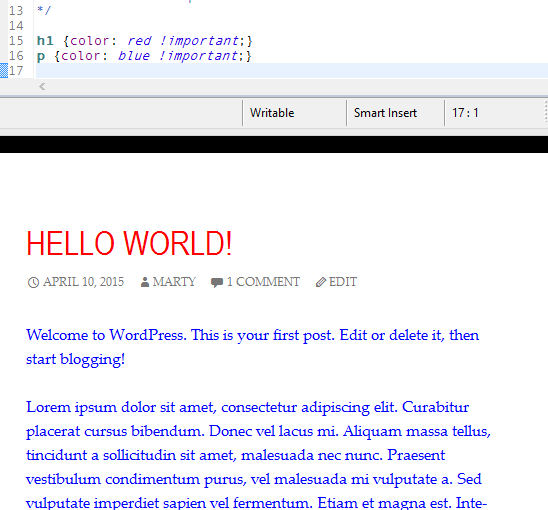
Yet my styles were not showing up. Not only were they not overriding the parent styles, Firebug showed that they were not even getting to the page.
Well, I wasn’t entirely confident about how I implemented my child themes. WordPress’ incomplete instructions said:
If your theme has more than one .css file (eg. ie.css, style.css, main.css) then you will have to make sure to maintain all of the Parent Theme dependencies.
… whatever that means. Then they then include this undocumented sample code:
Notice that the WordPress team never explained what literal string you should use instead of ‘parent-style’ — I assumed I should use ‘twentyfourteen-style,’ but I was just guessing. Maybe ‘twentyfourteen’ would have been correct, or maybe the name of the style was some other string that you have to look up somewhere.
I spent far too long looking for the missing documentation when finally I decided to forge ahead with trial and error.
Here are the results for what to use instead of ‘parent-style’:
When I used ‘twentyfourteen-style’
My styles did not show up. Firebug showed me that 6 css files were served to me, including blog/wp-content/themes/twentyfourteen/style.css?ver=4.2.2
When I used ‘anything-else-like-my-child-theme-name-or-jsldfkjsdlfkjsldkjw-or-even-literally-parent-style‘
My styles did show up. Firebug showed me that 7 css files were served to me, including blog/wp-content/themes/twentyfourteen/style.css?ver=4.2.2 and blog/wp-content/themes/mythemename/style.css?ver=4.2.2
So the short answer is that you should use the literal string “parent-style” in WordPress’ sample code. The only string you can’t use is ‘[yourParentThemeRealName]-style’ because then you will not actually see your override styles.
I did dig a little deeper and discover that the first parameter to the function theme_enqueue_styles is a key of sorts. Whatever name you give as the first parameter is the name of the “key” that WordPress uses to handle overrides. So if you use the same name twice, only the first occurrence will stick.
I used this to my advantage. I enqueued “a-different-unique-string-name” to include a secondary style sheet that I was already using elsewhere. As long as I used a unique name, I would get my child theme’s CSS file, as well as all the others that I stacked up in my queue.
Here’s the contents of functions.php that I ended up with:
“Hey, Mart, can you post the latest newsletter to my web site? By the way is that something I can do easily?”
I have many clients for whom I’ve built web sites. I usually try to let them make updates themselves through an admin interface, but even then, some clients would rather have me do the work.
For some people, updating their web site is about as fun and relevant to their job as filing taxes.
So what do you do when a client wants to be able to make changes to documents, or launch a blog, or post newsletters on their own web site?
WordPress to the Rescue (*assuming you drank the WP Kool-Aid)
I know many advocates of WordPress who say it’s just as easy to use as Word or Pages. They recommend it to all their clients. In fact, here I am on a WordPress site. And yet, I have a hard time recommending it for some of my clients, for many reasons:
Interface overload can be intimidating for someone who just wants to publish some text. As I type I have a sidebar with 8 options; I see two icons above the sidebar that I don’t necessarily understand, as well as a few cryptic buttons. As a computer professional, I don’t find them intimidating, but to someone who doesn’t know what’s okay to ignore, it’s more cognitive load.
WordPress requires an installation, of code and database.
WordPress is popular among hackers and spammers — just the sort of security risk most of my clients don’t want to think about.
WordPress doesn’t easily integrate with an existing design. Someone has to spend time customizing WordPress templates to sort-of match a site’s design.
WordPress does HTML structure how it likes to which means your blog and your site may not look exactly the same, and they may not share CSS and JS, requiring twice the effort for every update.
Don’t Start with a Hammer
Some would say that WordPress is a great tool. But when your favorite tool is a hammer all your problems look like nails.
Rather than recommending yet another unnecessary WordPress installation, I asked, what is it that my “newsletter client” was already doing? And how can we painlessly integrate that into her web site.
Well, she had written a newsletter in Pages. There was minimal formatting — a headline, paragraphs, one link, and a photo. She created a document, pasted a photo and e-mailed it to her friends.
Would there be some way to write a document, without all the overhead of WordPress, and include it on a web site?
Of course there is.
Markdown is Simple
One of the best experiences I had editing a document on a web site was submitting a correction to the CakePHP documentation. The documentation is hosted on github. When you find a page you want to edit, you click a button that opens the page’s Markdown source. You make whatever changes you like, then submit your version of the doc to be reviewed, merged, and published.
Because it’s markdown, you can’t inject any malicious code. You can’t ruin the structure or the design of the page. You can only add text, with basic formatting. So unless you type gibberish, you really can’t do much to break the site; you are just adding content.
WordPress’ HTML structure isn’t exactly “Simple”
Markdown’s resulting HTML is simple and clean, unlike what comes out of WordPress. It plays nice with whatever template and style sheet you’ve already defined.
For my client to save her newsletter as Markdown would be a simple matter of exporting her already-written document as plain text, and cleaning up three things –
adding # before the headline,
changing her link to [link text](url) format,
and changing the photo to .
Uploading
If she creates an .md (markdown) text file, it’s still not on her web site. Should she FTP the file into a special folder? That sounds like as much trouble as WordPress with even more risk.
What about hosting the documents on github? Well, it’s a nice idea but their system is entirely set up for hosting documentation. It’s not really usable for ad-hoc web sites.
However, the idea of committing code to a repository and pushing it seems like it might be pretty easy, especially if we find a very user-friendly program like Tower or SourceTree. She doesn’t need to know about source code or how git works, she only needs to know that she checks in her new newsletter when its done, and clicks Push when she’s ready to launch. (We already have an auto-deploy script running). Fixing a typo is as simple as editing the document and re-pushing it.
I think it could be easier and cleaner and less risky than WordPress. But I admit this could be one of my crazy ideas that’s more dumb than inspired.
I’ll visit my client on Friday and show her both options. We’ll see what she thinks.