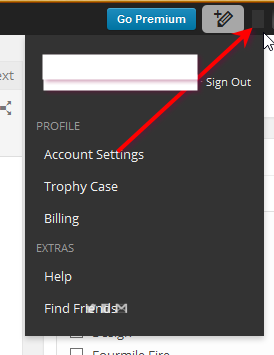
Hey WordPress, where did you hide the logout button?

Just posted on my completely standard WordPress blog. I did not customize the admin interface, this is just exactly as it comes, out of the box.

Now where in the hell is the logout button?

Here’s where I’ve looked so far:

How do I log out, WordPress?

How do I log out, WordPress?

… I know I could probably figure out the URL, but what the hell? Where is it?


UPDATE – I found it. It’s in the little blank gap between the pencil and the word balloon.

hereitis

“Blank gap” you ask?

Yes. Apparently regular people who do not block third-party trackers see a little circle served by Gravatar.

Those of us who are more privacy-minded, we get a blank spot.

Is Gravatar a privacy risk? StackOverflow says yes.


Posted in Uncategorized | 2 Comments

Ical and Daylight Savings time in PHP

The film festival I volunteer for is usually in February, but this year it takes place during the same weekend as the switch to Daylight Savings time.

For a 7-hour window before Daylight Savings Time, my iCal events were off by an hour

For a 7-hour window before Daylight Savings Time, my iCal events were off by an hour

Years ago I built a link on each detail page that lets you add the movie to your calendar via ical.

I actually did pretty well. I remember time zones being a huge pain, but whatever solution I ended up with worked for years. Even this year, most of the events are correct. I don’t know whether I wrote this function or found it, but it is the magic bullet.

private function unixToIcal($uStamp = 0, $tzone = NULL) 
{
    if ($tzone === NULL)
    {
        $tzone = date("Z", $uStamp);
    }
    $uStampUTC = $uStamp - ($tzone);
    $stamp  = date("Ymd\THis\Z", $uStampUTC);
    return $stamp;       
}

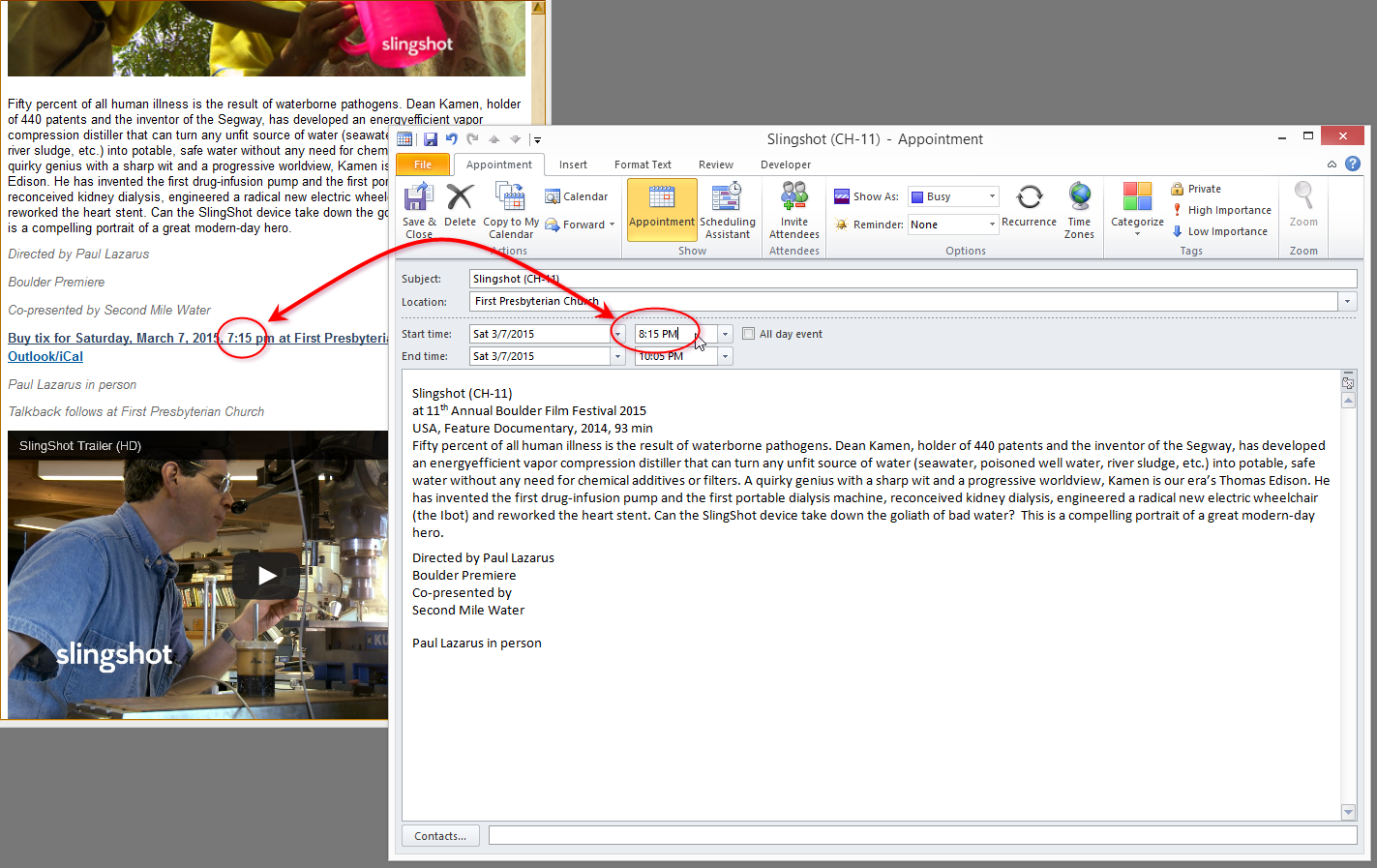
Unfortunately, starting with the 7:15 show on Saturday, the times are off by 1 hour. The 7:15 p.m. show gets added to your calendar at 8:15 p.m. And the 9:30 p.m. show is added at 10:30 p.m.

Astute readers will notice that the $uStampUTC variable is calculated by adding a difference between the (local) event time and UTC.  The problem is that at the time of the event — $uStamp — Daylight Savings has not happened yet. But at UTC time of the event — at $uStampUTC — Daylight Savings has begun.

After some thought and some debugging, I found a way to do this without adding and subtracting 7, but rather letting the computer do all of the adjusting.

Check the new improved method here:

private function unixToIcal($uStamp = 0) 
{
    $revert = date_default_timezone_get();
    date_default_timezone_set('UTC');
    $stamp  = date("Ymd\THis\Z", $uStamp);
    date_default_timezone_set($revert);
    return $stamp;       
}

I love it when a fix is shorter and simpler than the problem. In this case, we take the event time — $uStamp. Rather than converting time zones ourselves, we let PHP convert to UTC for us at the same time as it formats the date in ical format with:

date_default_timezone_set('UTC')

Then just to be polite we revert back to the system’s time zone.

Posted in Debugging, PHP, Web programming | Leave a comment

function dry(){echo “Do not repeat yourself”;} dry(); dry(); dry();

Jumpy Thumbnails

It was a snowy Saturday morning and I didn’t have a lot of pressing matters, so I decided to track down a silly issue, off the clock, for a client of mine. On two similar pages, the space below a group of thumbnails was different. The thumbnails were <img> tags wrapped in <a>tags, inside a <td>.

I started by using Firebug to see what styles were applied to the various elements on the page. I expected the padding or margin on either the <img> or <a> would be different between the pages.

Firebug showed that there were no differences in the applied styles, even though clearly there were differences on the page. Firebug even “admitted” as much by showing one <a> element grayed out, and showing the other one active. In Firebug, a grayed-out element means that means that it is not displaying. But again, the applied styles were identical, and on both pages the <img> tag were displaying. I noticed that page with the grayed-out <a> tag had less space — in fact, the <a> occupied no space at all, (implying a float? or zero height/width?) where on the other page, the <a> had dimensions.

Obviously it wasn’t a style issue since Firebug reported the CSS being identical. I decided to look at the raw HTML source code (which is generated by PHP) and discovered that one image contained the meaningless “align=’bottom'” and the other contained the equally meaningless “align=’left'” — I say “meaningless” because once you use CSS style sheets, they generally control the alignment, and not these HTML attributes.

Nevertheless, I removed them both. Sure enough, things started lining up.

dry();

There is actually a larger problem at work here. Because why should there be two, different, meaningless ways of doing the same thing?

The code that I found (but didn’t write) repeats two (slightly) different versions of the same 60-100 lines of code. What I found was something like this:

if (logic for top level page)
{
    // 60 lines of code to draw thumbnails
} else if (logic for sub-level page) {
    // 60 lines of code to draw thumbnails
    // 40 lines of code to do some other stuff
}

This is what is known as a Bad Practice. Once you write 60 lines of code, when you need to do the same thing again later, you don’t copy and paste those 60 lines. You encapsulate them and re-use them. If you need to modify 5 lines, you separate the 5 lines that are different and you reuse the 55 that are the same.

Because when you don’t, you end up making a change to one (“align=’bottom'”) that you forget to make to the other (“align=’left'”).

And you end up with a finished product that is buggy and inconsistent and difficult to fix.

Humbleness Disclaimer

This sort of programming mistake really frustrates me. I spend hours debugging some stupid flaw that, really, is hardly worth fixing. I mean, 4 pixels of white-space difference should not be worth an hour of my time. (In fact, I didn’t bill my client for this fix because my professional advice would have been to save their money.)

If the code had made use of a “drawThumbnails()” function, this wouldn’t have been an issue. If the pages are supposed to look the same, they should be made from the same mold. This is why “DRY” (Don’t Repeat Yourself) is an important rule for programmers.

And now that I’ve finished my rant, I’d like to acknowledge that somewhere, out there in the wide Internet, is a post just like this one, written by some poor programmer who inherited my awful code from five years ago.

To you, I apologize. I am always learning and always improving. Unfortunately that means that stuff I wrote years ago is guaranteed to be embarrassing today. Maybe I didn’t get enough time to finish the project well, maybe I was swamped with other work and had to leave well enough alone. Or maybe I was just younger and dumber and there are no excuses. Hopefully you’ll forgive me rather than curse my name.

Let’s all agree to write better code, not release anything that isn’t ready, and not be too hard on the developers who came before us.


Posted in Refactoring, Web programming | Leave a comment

Years of LiveMesh and SkyDrive, down the drain

Goodbye, SkyDrive. Nice knowing you. Thanks for the memories.

Goodbye, SkyDrive. Nice knowing you. Thanks for the memories.

I started with Windows LiveMesh, which later became SkyDrive, as a way to automatically sync documents from my laptop, where I do a lot of writing, to my desktop, where I do a lot of publishing. It’s a tool I’ve been using for four or five years. I just save my writing to a predictable folder, and without me having to remember to do anything, all my files are available when it comes time to publish.

Dropbox came along, then Google Drive, but I liked that LiveMesh — and then SkyDrive — was a Microsoft product, built to work seamlessly in the operating system. So I stuck with it as my primary tool, even after the other services came along.

After years of syncing, I’m sorry to say that SkyDrive is broken for me. It happened this weekend, when I installed Windows 8.1 on my laptop.

Windows 8.1 breaks the old SkyDrive

Technically, SkyDrive still exists. But once you install Windows 8.1, you must relinquish control of your computer’s login — the login that happens when you turn on your computer — to Microsoft, or you will not be able to use SkyDrive.

Windows takes .1 steps backward

Windows takes .1 steps backward

That’s right; you can either choose to keep your computer on a “Local Account,” or you can have SkyDrive — but not both. If you want SkyDrive, you must agree to use your Microsoft account to unlock your own computer.

I don’t love the idea of joining those two accounts. If someone hacks my Microsoft account, they can get into my computer, and vice-versa. If you have different passwords for your physical computer and your Microsoft account, being hacked on one does not compromise the other. But that’s not actually my complaint — not exactly.

Different passwords for different situations

I think the SkyDrive team failed to imagine my own scenario.

Currently, I log in to my computer using a password that I can remember and that I can actually type pretty quickly. That gets me in to Windows, lets me check email, type some notes, and so forth. It’s not my best password, but I have the added security that it’s not much good by itself — you would have to steal my computer and hack my password to get at my data. And really, if you’ve stolen my computer there are probably easier ways at getting my data than guessing my Windows password.

But I am much more careful about my Microsoft account, as I am with all my Internet accounts. I have a unique, and supremely good password for my Microsoft account. It is stored in an encrypted vault. I don’t even know what the password is, and when I look at it now, I realize it would take 60 seconds to carefully type, and I’d probably make a mistake or two along the way.

Obviously that’s not how I’ve been logging into my SkyDrive folder. What I do instead is open my password vault and let it log in to my Microsoft account for me.

So to return to the great Windows 8.1 SkyDrive lockdown, since there is no way I’m going to memorize a complicated, long, and difficult password just to check email or type some notes, my remaining options are:

  1. keep SkyDrive, but weaken my Microsoft password
  2. drop SkyDrive, after several years of loyal service
  3. hope that Microsoft reads this blog and offers another solution

In the meantime, I’ve got writing and publishing to do, so I suppose I’ll be reading up on my options from #2.

Posted in Microsoft Windows | Tagged , , , , | 1 Comment

First look at the new Daily Camera website

Here is literally the first look I had at the Daily Camera’s proud new web site

Daily Camera's new web design

Posted in Uncategorized | Leave a comment

MacBook Air, Windows 8(.1), and Hardware

I’m replacing my notebook and mac mini with a new MacBook Air. My notebook runs Windows, so Boot Camp (version 5) is an essential part of the equation.

Last night was my first attempt. Call it 3 hours and 4 attempts. So far, I still do not have a Windows notebook computer.

There are two scenarios I’ve tried, and the each fail in a different way. The major pain point, however, has to be the download of Windows drivers from Apple.

Windows 8.1

I downloaded the Windows 8.1 preview ISO and followed the instructions on the Boot Camp 5 assistant. I waited—a long time—for the assistant to download the Windows drivers. When it was finished, it rebooted and automatically began to set up Windows. Several minutes later, I had a copy of Windows 8 running on my mac. Neat.

Problem is, there was no network. No networks were available, and the network adapter wasn’t even working.

Windows 8

No problem, I thought. I’ve demonstrated that it’s possible to run Windows on my mac. Plus, I’d rather have my licensed copy of Windows 8 (not the preview of Windows 8.1) so that I don’t have to reinstall everything when the preview expires.

So I go through the motions. I wait—a long time—for the assistant to download the Windows drivers. Then it eventually reboots to set up Windows. I click Next on the screen that asks about language settings. But eventually I get to the welcome screen where it asks me to choose my favorite color and enter my name. And I can’t do anything. Keyboard doesn’t work. Trackpad doesn’t work. (How was I able to click Next only a few screens ago?) The only button that works is the power button, and it won’t even boot into OSX.

Luckily I read about holding the Alt key down while powering the thing on, and I can bail out and back into OSX.

Windows 8.1 Again

By this time, it’s several hours later and I’ve forgotten that the 8.1 install didn’t have the network, so I went through the whole mess again. I wait—a long time—for the assistant to download the Windows drivers, and I let it reboot into Windows 8.1 Then, “Damn,” it hits me, the network card won’t work in 8.1.

Google It

All throughout the evening the Internet was not very helpful. Lots of people had the same issues, but most of what’s out there is problems with Boot Camp 3 (I have 5), and most of the information is just repeating the instructions I had already followed. One particularly unhelpful comment on a Mac bulletin board suggested that if more people read the directions, fewer people would have problems.

One piece of advice was to repeat the whole procedure using the left side USB port for the memory stick. Didn’t help. Another “answer” came from Apple itself, suggesting that I use a USB 2.0 memory stick instead of my brand-new, purchased-just-for-this-installation USB 3.0 memory stick. Maybe I’ll have to end up downgrading in order for this to work.

Meantime, I’m killing a few minutes before I can go to the Apple store to beg for help. That’s part of why I opted to get a more-expensive Mac laptop than a cheaper Lenovo or HP—there’s a store of tech experts in town who will help me—at least for the first 2 weeks. Here’s hoping they have better luck than I do.

Posted in Apple Mac OSX, Hardware | 1 Comment

Apache MultiViews automatically appends .html, but I don’t want it to

Hat-tip to Abdel-Karim Mardini for reminding me which Apache directive is poison. It’s Options MultiViews.

A client reported that WordPress pages weren’t working. For example, example.com/press/ was showing a 404, even though WordPress had a page with that permalink. What was strange was that example.com/press was showing a very old version of the correct page, which was stored on the file system as press.html.

I checked the code on my local server and looked through the apache log files. No help. I deleted all the directives from .htaccess. It was still happening. But I vaguely remembered that Apache “automagically” appends .html to certain URLs. Google was very little help, mostly showing me how to write apache rewrite rules. But since I had disabled .htaccess, I knew that wasn’t it.

I finally found Abdel-Karim’s summary, and sure enough, appending this to my .htaccess file, worked:

Options -MultiViews

Here’s hoping I remember to check my blog next time, before spending hours staring at log files and useless search results.

Posted in Uncategorized | Leave a comment

CakePHP logoutRedirect is not the same as loginAction

If you go through the CakePHP Auth example tutorial, you’ll end up with two (not three) configuration settings in your AppController > components > Auth settings. They will look like this:

public $components = array(
        'Session',
        'Auth' => array(
            'loginRedirect' => array('controller' => 'posts', 'action' => 'index'),
            'logoutRedirect' => array('controller' => 'pages', 'action' => 'display', 'home')
        )
    );

I unconsciously made the incorrect assumption that “logoutRedirect” would always take you to the login page. You log out.

You get redirected to the login page. But when I put my carefully crafted login page at pages/home. Yet when I visited my site without a proper cookie, I wasn’t redirected to pages/home. I was redirected to users/login. Where the heck was that coming from?

Turns out there is another AppController > components > Auth setting that specifies where the login action is found. When you add it to your other components, it will look like this:

public $components = array(
        'Session',
        'Auth' => array(
            'loginAction' => array('controller' => 'pages', 'action' => 'display', 'home'),
            'loginRedirect' => array('controller' => 'posts', 'action' => 'index'), 
            'logoutRedirect' => array('controller' => 'pages', 'action' => 'display', 'home') ) );

It seems that logoutRedirect is only used for where to go, immediately after logging out.

I wrote this post because a coworker had made the exact same assumption and mistake as I had.


Posted in CakePHP | Leave a comment

CakePHP Auth->allow only works on actions, not controllers

If you follow the CakePHP documentation on Authentication, you might end up with this line of code in your AppController.php file, in the beforeFilter() method.

$this->Auth->allow('view', 'index');

… And that’s fine for demo purposes. But that actually allows all view() and index() actions, on every controller in your application.

That’s not likely what you want. You will need to move that line of code out of the global AppController.php file, and put it in each SpecificWhateversController.php file, allowing whatever the specific actions you want to allow to users who have not logged in.

Posted in CakePHP | Leave a comment

WordPress “recent posts” file to be included on another page

I have a client who finally asked for something I told him we could easily do. He wanted the recent posts from their blog sub-site to be listed on a sidebar on their main site. We wanted a dynamic list of the most recent headlines, linked to the content.

Since we already spent the budget on “bigger fish,” Before I muddled my way through the WordPress templates, I did a quick web search to see if someone had already written my code for me. Sure enough, David Walsh, a respected developer whose work I already follow, had the answer. I’ll send you to his blog for the code.

Create a “Recent Posts” Module Outside of WordPress

Thanks, Mr. Walsh. Keep up the good work.

Posted in Web programming, WordPress | Leave a comment